Essential Reads in Sparta White County, Tennessee

Burnout Signs Busy Adults Often Miss
Burnout can build slowly, especially for busy adults who are used to carrying a lot of the load. Work, family responsibilities, caregiving, appointments, bills, and daily commitments can pile up until feeling worn down starts to feel normal. The signs of burnout aren't always dramatic, either; sometimes burnout looks like being tired all the time, losing patience faster than usual, or struggling to care about things that used to feel manageable or enjoyable. Noticing these shifts when they're still little can make it easier to adjust before exhaustion takes over. Burnout Can Show Up in the Body Burnout is often thought of as emotional exhaustion, but the body can feel it too. Headaches, muscle tension, stomach issues, sleep changes, and fre…

Dead Battery or Bad Starter? How to Tell Why Your Car Won’t Start
A car that won't start doesn't automatically mean the battery is dead. While the battery could be the cause, the starter, alternator, cables, or other electrical component could also be responsible. You probably won’t be able to confirm the cause from the driver’s seat, but a few clues can help you decide whether to try a jump-start, call roadside assistance, or arrange a tow. What Are the Most Common Signs of a Dead Battery? A weak or dead battery usually affects the rest of the vehicle’s electrical systems. This means you might notice: Dim or flickering headlights Dashboard lights that don’t come on A quick clicking noise when you try to start the engine An engine that cranks slowly No response from the vehicle at all Battery trouble is m…

Questions to Ask a Well Drilling Contractor Before Hiring
Drilling a new well or replacing part of an existing well system is a significant project. The contractor you choose can affect everything from the installation process and project cost to the reliability of your water supply afterward. Before hiring a well drilling contractor, take time to understand their experience, the work they’re proposing, and what will happen if conditions on your property are different from expected. A detailed conversation before the project begins can help prevent confusion later. At a Glance: What Should You Ask a Well Drilling Contractor? Before signing a contract, ask about: Licensing and insurance Experience with similar wells and local conditions References or recent projects The proposed drilling process Pe…

How to Choose Promotional Products People Will Actually Use
Promotional products can keep a business visible long after an event, purchase, or customer conversation. But that only happens when the item is useful enough to earn a place in someone’s daily life. Before ordering branded merchandise, think beyond what looks clever in a catalog. The strongest choices reflect the recipient’s habits, the setting in which the product will be distributed, and the impression the business wants to leave. What Makes a Promotional Product Worth Keeping? A promotional product is more likely to be used when it solves a small problem, supports an existing routine, or offers everyday convenience. Instead of ordering the same pens, tote bags, or water bottles as other businesses, make sure your item has a clear purpos…

Questions to Ask Before Starting a New Medication
Starting a new medication can come with a lot of information. You might hear instructions during an appointment, read details on the prescription later, and still think of questions later when you're already home. Having a few clear questions ready to ask can make a new medication easier to manage. These questions can also help you understand what the medicine is for, how to take it safely, and when to call your provider or pharmacist for help. What Is This Medication Supposed to Do? Before starting a new medication, make sure you understand why it was prescribed. Some medicines treat specific symptoms, while others help manage an ongoing condition or reduce the risk of future problems. Ask what the medication is expected to do and how you…

How to Help Your Loved Ones Transition to Assisted Living
Making the move to assisted living is a huge life change for seniors and their families. Even making the initial decision to do so can bring a lot of mixed emotions. While the transition can bring greater safety, support, and social opportunities, it can feel overwhelming in the beginning—especially for those who have been independent for so long. If you're helping a loved one make the move (or preparing for it yourself), careful planning and open conversations can make the adjustment much easier. Here are a few ways you can navigate this chapter together and make assisted living feel more like home. 1. Have Open and Honest Conversations Talking about assisted living can be difficult, especially if a loved one is hesitant about the change.…

How to Make Moving Day Easier Before the Truck Arrives
Moving day can be exciting, but it also has a way of bringing every unfinished task into focus at once. Half-full boxes still need labels, closets are much fuller than you remembered, furniture is heavier than you thought, and someone usually asks where the tape went. A smoother move typically comes down to what happens before the moving truck arrives. A little planning can help you or your movers work more efficiently, protect your belongings, and reduce the number of last-minute decisions that need to be made on a busy day. Start by Decluttering Before You Pack Packing is easier when you are not boxing up things you no longer need. Before the move, go through closets, cabinets, garages, storage areas, and spare rooms with a practical eye.…

Should Your Small Business Invest in Custom Software?
Many small businesses start with basic software, and for good reason. It’s usually faster to adopt, easier to budget for, and enough to handle the basics. A prebuilt system can help with scheduling, customer information, invoices, inventory, marketing, payroll, operations, or daily communication without requiring a business to build anything from scratch. For many businesses, that’s exactly what they need. But as a business grows, the cracks can start to show. A company may end up juggling multiple systems, forcing processes to fit the software, or spending too much time on workarounds. What once felt efficient can slowly become frustrating. That’s when custom software enters the conversation. The question is. does it solve a real problem i…

7 Beginner-Friendly Machines to Use at the Gym
Walking into a gym for the first time can feel overwhelming. Even if you know you want to exercise, figuring out which machines to use, how to adjust them, and where to begin can make that first workout harder than it needs to be. The good news is that you don't need to learn every piece of equipment at once. A handful of beginner-friendly machines can help you get comfortable with cardio and strength training while giving you time to learn proper form and build confidence. Here are seven approachable gym machines to start with, along with some tips for using each one safely. 1. The Treadmill Why It’s Great for Beginners: The treadmill is a staple in any gym and perfect for beginners. It’s user-friendly and allows you to control your workou…

How Often Does Your Dog Really Need Grooming?
Regular grooming helps your dog stay comfortable, neat, and looking fabulous. The right schedule can reduce shedding, prevent painful mats, and even make it easier to spot skin, ear, nail, or coat problems. However, there isn't one grooming schedule that fits every dog. A short-haired dog who spends most of the day indoors probably doesn't need the same grooming routine as a curly-coated dog who loves mud, swimming, and outdoor play. Here are a few ways to figure out the best grooming routine for your dog. At a Glance Most dogs benefit from regular brushing, routine nail trims, occasional baths, and periodic haircuts. How often they need professional grooming depends on their coat type, activity level, skin health, age, and how much groomin…

What Should You Ask Before Hiring a Home Builder?
Choosing a home builder involves more than simply liking a certain floor plan or comparing a few estimates. The builder you hire will shape your budget, timeline, design choices, construction quality, and day-to-day experience throughout the project. You’ll want someone who explains the process clearly, answers questions directly, and helps you understand what’s included before work begins. Before you sign a contract, take time to ask detailed questions. The answers can help you spot a strong fit, avoid preventable misunderstandings, and feel more confident about one of the biggest projects you may ever take on. What Should You Ask First? Start with the basics: Are you licensed and insured? What types of homes do you build most often? Who w…

5 Budget-Friendly Digital Marketing Strategies for Small Business Success
Small businesses don’t need massive marketing budgets to build a strong online presence. What matters more is choosing a few strategies that make sense for your audience, using them consistently, and paying attention to what actually brings customers closer to your business. That’s especially true in 2026, when customers may discover businesses through traditional search results, maps, social media, recommendations, email, and AI-assisted search experiences. Instead of trying to be everywhere, focus your time and budget where they’re most likely to make a difference. 1. Create Useful Content That Answers Real Questions Content marketing remains one of the most accessible ways for a small business to build visibility and trust. The strongest…

How to Support a Teen Who Seems Withdrawn
Teenagers naturally need more privacy as they grow, but a noticeable change in mood, behavior, or connection can leave parents wondering what to do. A withdrawn teen might be dealing with stress, friendship issues, school pressure, anxiety, depression, bullying, or something they don't yet know how to explain. The main goal is to pay attention without immediately assuming the worst. A calm and steady response can make it easier for a teen to feel supported instead of cornered. What Withdrawal Can Look Like Withdrawal can look different from one teen to another. Some teens spend more time in their rooms, avoid family conversations, or lose interest in activities they used to enjoy. Others may seem irritable, tired, distracted, or unusually q…

What Causes a Computer to Freeze?
A computer that freezes once could just be a temporary issue. A computer that freezes repeatedly is usually trying to tell you something. When the screen locks up, your cursor stops moving, or the system stops responding, the cause isn't always obvious. The same symptom can point to several different problems, including software conflicts, overheating, memory strain, storage trouble, or failing hardware. Staying aware and being proactive can help protect your files. Why Does a Computer Freeze? A computer freezes when it gets stuck trying to complete a task, respond to a command, or manage a problem in the background. Sometimes the issue is only temporary while the computer works in the background. A program may stop responding, an update co…

The Importance of Proper Attic Insulation
If your home feels too warm in the summer even with the AC running, your attic insulation might be part of the problem. A properly insulated attic can help keep indoor temperatures more stable throughout the year. At a Glance Proper attic insulation can help: Maintain cooler temperatures in the summer and warmer temperatures in the winter Reduce heat transfer between the attic and living areas Improve indoor comfort and reduce hot or cold spots Improve your HVAC system's efficiency and reduce strain placed on equipment Lower unnecessary energy use If your home has uneven temperatures, rising energy bills, or old and deteriorating insulation, it could be worth having the attic evaluated by a professional. Why Does Attic Insulation Matter in…

How to Prepare for a Professional Brand Photo or Video Shoot
A professional photo or video shoot can give a business stronger marketing content, more polished visuals, and a better way to show customers who they are and what they do. But great results rarely happen by accident. The most successful media days usually come from thoughtful preparation. When a business knows what it wants to capture, who needs to be involved, and how the content will be used, the final images or videos tend to feel more natural, more useful, and more aligned with the brand. Quick Answer: What Should a Business Do Before a Brand Shoot? Before a professional photo or video shoot, a business should define the purpose of the shoot, create a simple shot list, prepare the space, communicate expectations to employees, and think…

When Should a Mole Be Checked by a Dermatologist?
Some people have more moles than others, and many people have moles that have looked the same for years. Still, it's a good idea to pay attention when an existing mole changes or when a new spot looks different from the others. A dermatologist can examine the area thoroughly and determine whether your moles look normal, need monitoring, or should be tested further. When it comes to skin changes, getting a clear answer is better than guessing. Know What Is Normal for Your Skin Everyone’s skin is a little different. Some people have a lot of moles, freckles, or sun spots, while others have only a few. The important thing is to become familiar with what is your "normal." A quick skin check at home can help you notice changes. Take a close look…

Preparing a Used Car for Sale: Cleaning and Presentation Tips
When you're selling your car, presentation can raise the value and make it easier for buyers to evaluate the vehicle. Before you list it for sale, remove personal items, clean the interior and exterior, address obvious stains or odors, and take clear photos that show the vehicle honestly. The goal is to help buyers see that the car has been cared for and understand its condition before they come to see it. Quick Answer To put it plainly: clean the car before you take listing photos. Remove personal items, vacuum the seats and floors, wipe down interior surfaces, clean the windows, address stains and odors, wash the exterior, and take photos once the car is fully dry. Focus on honest presentation rather than trying to hide wear or damage. St…
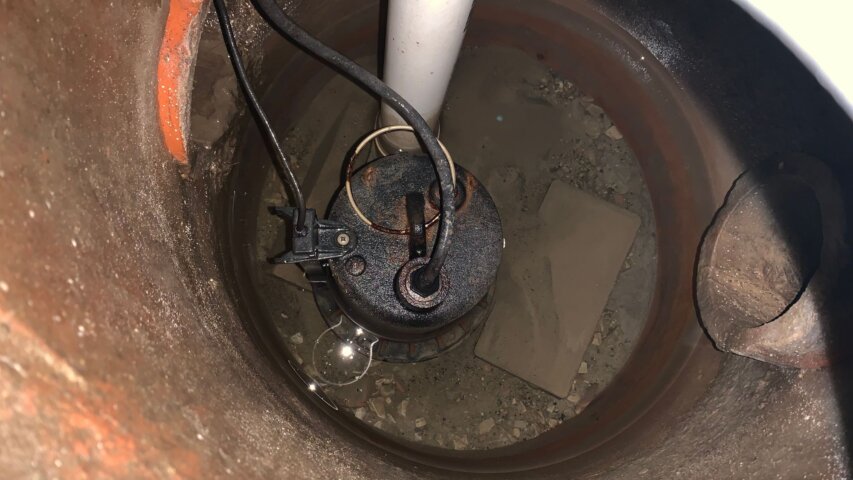
The Homeowner’s Guide to Sump Pumps and Basement Moisture
Basements and crawl spaces are naturally more vulnerable to moisture than other parts of a home. They sit below ground level, where rainwater, soil conditions, drainage issues, plumbing leaks, and humidity can all play a role. Sometimes the signs of moisture are obvious, like standing water after a storm. Other times, the clues are more subtle. A sump pump can be an important part of managing water around a home’s foundation. It isn't the only piece of the moisture-control puzzle, but it can help move water away before it collects where it shouldn't. For homeowners, understanding how sump pumps work and what basement moisture warning signs look like can make it easier to take action early. A Sump Pump's Job A sump pump is usually installed…
What Slows Down a Business Website (and What to Fix First)
If your business website feels slow, you probably don't need to become a website expert to start figuring out why. A few simple checks can help you spot common problems, including unnecessarily large photos, a homepage that's trying to do too much, or features your business no longer needs. You can also use free website speed tools to get a second opinion. Just as important, you should know when to stop troubleshooting on your own. Some improvements are simple. Others involve parts of your website that are better left to someone who knows how the site is built. How Can You Tell If Your Website Is Too Slow? Start by experiencing your website the way a potential customer might. Pull it up on your phone and visit the pages that matter most to…

Signs Your Child May Need an Eye Exam
Children don't always know how to explain blurry vision. Most might not even notice and assume everyone sees the same way they do. They might compensate by squinting their eyes, moving closer to something, or avoiding tasks that feel too hard. Because vision can affect reading, schoolwork, sports, and everyday comfort, it helps for parents and caregivers to know the signs that it might be time for an eye exam. Squinting or Sitting Too Close Squinting is one of the more noticeable signs that a child is having trouble seeing clearly. A child might squint while watching TV, looking at the board at school, reading signs, or trying to focus on something across the room. Sitting very close to screens or holding books and tablets close to their fa…